8.0. Overview
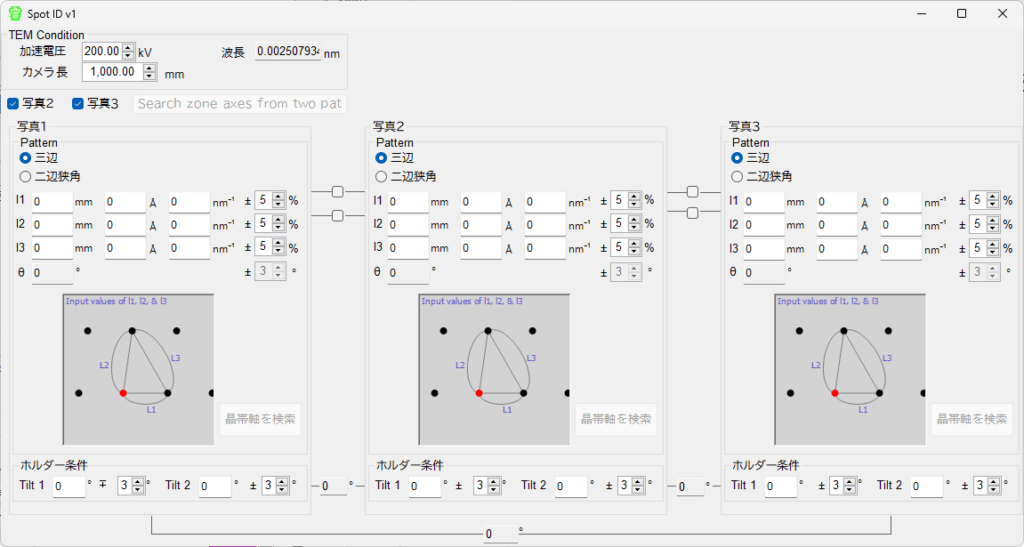
”Spot ID v1″ indexes diffraction patterns obtained by selected-area electron diffraction (SAED) in a transmission electron microscope (TEM).
By entering the TEM observation conditions and the geometry of the diffraction spots, then pressing the “Search zone axis” button, candidate zone axes are searched.
8.1. TEM Condition
Enter the TEM observation conditions. Set the accelerating voltage and the camera length.
8.2. Photo 1, 2, 3
Enter the diffraction pattern. To input the distance between spots on the detector, enter the value in the mm unit box. If the d-value is known, enter the value in the Å unit or nm-1 box. Select one of the following two modes to define the geometry of the diffraction pattern.
Three Sides
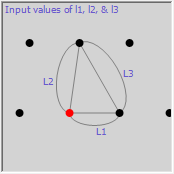
Enter the lengths of three sides of the triangle that includes the direct spot as a vertex.
Two Sides and Included Angle
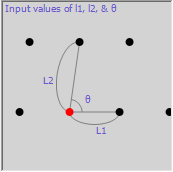
Enter the lengths of two sides of the triangle that includes the direct spot as a vertex and the angle between those two sides.
To search for the zone axis from a single photograph, press the “Search zone axis” button.
If diffraction patterns have been obtained from multiple orientations, check “Photo 2” and “Photo 3”, and enter the geometry of the diffraction pattern for each. Also, enter the holder tilt angle conditions for each photograph. Finally, press the “Search zone axis from two or three…” button to perform a zone axis search that also takes the inter-holder angles into account.